


MassLive.com
3.0164.00 Reviews
App Specs
- Version
- 5.0.0
- Updated On
- License
- Free
- Downloads
- 50,000+
- Developer
- MassLive
- Categories
- News & Magazines
- Platform
- Android
Screenshots



 Analysis by AppCompare
When I want to know what is happening around Massachusetts without bouncing between a general news site, a weather source, and a sports feed, I want one place that gives me a useful starting point. That is the role MassLive.com can fill: a free news and magazines app from MassLive, built around news, weather, sports, and entertainment. I find it most useful when I treat it as a local check-in rather than a complete replacement for every source I follow.
Start with the question you need answered
My first step is to decide what I am opening the app for. If I have a few minutes before leaving home, I want a quick sense of local developments and the day’s conditions. If a game, community issue, or entertainment story is what brought me in, I can spend longer with that subject instead. Keeping that purpose in mind helps the local mix feel practical rather than like an endless stream of headlines.
This is especially useful for readers whose interests are split across the state: someone may care about news near home, follow a Massachusetts team, and still want a broader look at what is happening elsewhere. MassLive gives those interests a shared destination. It is less suited to a reader who only wants national and international coverage, since a broad wire-service app or a newspaper with a global focus will be a better match for that need.
Move from a quick check to a deeper read
Once I open a story, I use the article itself to decide whether it deserves a longer visit. A short check can be enough to understand why a local development matters; if the topic affects a commute, a community decision, or a team I follow, I can stay with it and read more. The practical benefit is not simply having many topics together. It is being able to move from a headline that catches my attention to the particular local subject I care about.
For a realistic routine, imagine checking the app before heading out, noticing a weather item, then switching to a local news story while waiting for a ride. Later, a sports update may be the reason to reopen it. That is a natural way to use a local publication: brief visits tied to the day, rather than expecting one session to answer everything. I would still check a dedicated weather service when a decision depends on precise, current conditions, and use an official source when I need an authoritative notice.
The app is free to download, though in-app purchases are offered, with prices ranging from under a dollar to one hundred dollars per item. That makes it sensible to check any purchase prompt before proceeding, especially if you are only looking for casual access to local coverage. It is rated Teen, so families should take that age guidance into account when deciding whether it suits a younger reader.
Getting to Know MassLive.com
First things first, let’s talk about the interface. Right off the bat, you’ll notice that MassLive.com is super user-friendly. The layout is clean, making it easy to navigate through different sections like news, sports, entertainment, and more. You won’t find yourself lost in a sea of information, which is a big win in my book!
Worth Reading Before You Choose

EA SPORTS FC Mobile 26 Is a Bigger Football Game, but It Takes Time

Flipboard Shows What News Apps Must Do Beyond the Feed

Switching to Android Auto Means Rethinking Your Driving Routine

Google Calendar Makes a Crowded Week Easier to Manage

Ludo King Makes the Most of the Minutes Between Plans

Baby Panda World Brings Quick Play to Modern Phones, but Its Game Library Feels Busy
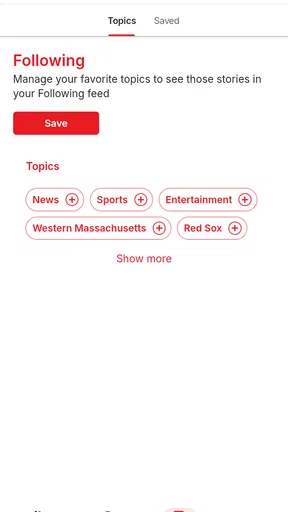
One of the app’s standout features is the localization. It’s tailored to bring you news that matters the most in your area. Whether you’re interested in politics, local events, or business, you get to customize what you see on your feed. This level of personalization is something I didn’t realize I needed until I started using the app.
Features that Shine
Let’s dive into some of the features that made me a fan. First up, the push notifications. I know, I know, notifications can be annoying, but with MassLive.com, they’re actually useful. You get timely alerts for breaking news, so you’re never out of the loop. Plus, you can easily toggle these on or off, depending on your preference.
My advice is to be selective about alerts. Breaking news can be valuable when it concerns a major local event, but frequent interruptions are a poor trade if you only open the app for a relaxed catch-up. I would start with notifications disabled or limited, then enable them only if I find myself repeatedly missing stories that matter to me. This keeps the phone from turning every headline into an urgent task.
The app also offers an impressive multimedia experience. Articles come with high-quality images and videos, bringing stories to life. It’s not just about reading; it’s about experiencing the news. I found myself engaging more deeply with stories because of this feature.
Images and video can add context, but they also make a story less convenient to skim when I am in a hurry or using a limited connection. I treat them as a reason to pause when the subject benefits from seeing the scene, rather than something I need to open every time. For a quick fact check, reading the text is usually the more efficient route; for a visual event or a human-interest story, the media can make the coverage feel more immediate.
Reading Experience
Reading on MassLive.com is a breeze. The text is crisp and clear, with adjustable font sizes for those of us who might need a little extra help seeing those tiny letters. I’ve spent hours scrolling through articles and never once felt strained or tired.
Adjusting the type size early is a small but worthwhile step if you plan to read more than a headline or two. It is better to set a comfortable size before settling in than to keep pinching or squinting halfway through an article. That matters most for longer reads, while someone who only checks a headline on a break may not need to change anything.
There’s also an offline reading option, perfect for those moments when you’re stuck without Wi-Fi. Just download the articles you’re interested in, and you’re good to go. This feature has saved me countless times during commutes and flights.
For a commute, I would pick the articles I genuinely want to finish before losing a connection, rather than assume every story will be available offline automatically. That simple habit turns offline reading into a deliberate queue: choose a few pieces while connected, then read them when the signal drops. It is useful on a train or plane, but it is not a substitute for live updates, since anything changing after the download will need a connection to catch up.
Community Engagement
What’s news without a little discussion? MassLive.com has a vibrant community of readers who love to chime in with their thoughts and opinions. The comment sections are lively, and it’s easy to join the conversation. I’ve found it to be a fantastic way to see different perspectives and engage with fellow readers.
I read comments as a view into how other readers are reacting, not as a replacement for reporting. On a contentious local topic, the discussion can surface questions or neighborhood concerns I had not considered; it can also become more heated than informative. I get the most out of it when I finish the article first, separate readers’ interpretations from the reported facts, and avoid treating a popular comment as confirmation.
Moreover, the app encourages user interaction with polls and surveys. It’s a neat way to feel more connected to the stories you’re following. Plus, it gives you a sense of involvement in the community.
Polls are best understood as a quick snapshot of participating readers’ opinions, not a formal measure of what everyone in Massachusetts thinks. I would use them to see what conversation a story has prompted, then return to the article for the reporting behind it. That distinction makes the interactive side enjoyable without giving it more weight than it deserves.
Who will get the most from it
I would recommend this app most readily to someone who wants a Massachusetts-centered habit: checking local news in the morning, following sports during the week, or keeping an eye on regional entertainment and weather. It can also suit former residents who want a familiar connection to stories back home. The app has been available since February 17, 2011, and its current version is 4.5.2.2; it requires Android 8.0 or later. On Google Play it has an average rating of 3.0 from 427 ratings, with 50K+ installs and 163 written reviews. Those figures suggest an established but not universally loved app, so I would judge it by whether its local coverage fits my routine rather than expect a perfect experience for every reader.
Compared with a national news aggregator, MassLive’s main advantage is its Massachusetts focus. Aggregators can offer a wider range of publishers and a more varied national picture, but local stories may be harder to find among everything else. A single newspaper app can provide a more focused editorial experience, while a dedicated weather app or league-focused sports app may be more useful for specialized, minute-by-minute needs. I see MassLive as the convenient middle ground: a regional starting point, not the only tool a reader will ever need.
Final Thoughts
In summary, MassLive.com is a solid choice for anyone looking to stay informed about local news. Its user-friendly design, personalized feed, and engaging multimedia elements make it a joy to use. Whether you’re a news junkie or just someone who likes to stay updated, this app has got you covered.
So, if you’re in the market for a reliable news app that won’t overwhelm you, give MassLive.com a try. It’s like having your own personal news hub, right at your fingertips. Trust me, you won’t regret it!
Where the routine can fall short
The biggest trade-off is that a local-first app will not answer every question with the same depth. If I need comprehensive national coverage, a specialist weather forecast, or an official emergency instruction, I would go directly to a source built for that purpose. Likewise, readers who do not follow Massachusetts at all may find the central focus too narrow to justify keeping another news app on their phone.
There is also a difference between keeping up and being constantly informed. Notifications, comments, multimedia, and a feed can each invite another check, so I find it helps to set a purpose for opening the app and leave when I have answered it. If I want a calm, quick local briefing, I can scan a few stories; if I want to explore a topic, I can give it time. That boundary makes the experience more useful and less like an unplanned scroll.
Overall, I would choose MassLive when local Massachusetts coverage is the point, especially if I want news, sports, entertainment, and weather in one place. I would pair it with a specialist source when accuracy or immediacy in a particular area matters more than convenience. Used that way, it is a practical companion for staying connected to the region without pretending one app can replace every source.
Pros
- User-friendly interface with easy navigation.
- Comprehensive local news coverage.
- Frequent updates keep content fresh.
- Customizable notifications for breaking news.
- Ad-free experience with subscription.
Cons
- Limited international news coverage.
- Occasional app crashes reported.
- Requires account for some features.
- Subscription needed for full access.
- Video content can be slow to load.
FAQs for MassLive.com
What is MassLive.com and what features does it offer?
MassLive.com is a comprehensive news app that provides users with the latest updates from Massachusetts, including local news, sports, entertainment, and more. It features real-time notifications, customizable news sections, and in-depth coverage of major events. The app is designed to keep users informed with high-quality journalism and engaging multimedia content.
Is MassLive.com free to use, or does it require a subscription?
MassLive.com offers free access to a wide range of news articles and updates. However, for full access to premium content and an ad-free experience, users may opt for a subscription. The app provides flexible subscription options to suit different needs, ensuring users can choose the level of access that best suits their preferences.
How do the notifications work on the MassLive.com app?
The MassLive.com app provides customizable push notifications to keep users updated on breaking news and important stories. Users can select specific topics or categories of interest, ensuring they receive alerts that are relevant to them. This feature helps users stay informed without being overwhelmed by unnecessary updates.
Can I personalize the content I see on MassLive.com?
Yes, MassLive.com allows users to personalize their news feed by selecting preferred categories and topics. This customization ensures that users see the content that matters most to them, such as local news, sports, or entertainment. The app's user-friendly interface makes it easy to adjust these settings at any time.
Is MassLive.com available on both Android and iOS devices?
MassLive.com is available for both Android and iOS devices, offering a seamless experience across platforms. Users can download the app from the Google Play Store or the Apple App Store. The app is designed to function smoothly on various devices, providing an intuitive and responsive user experience regardless of the operating system.


